Pages

Thursday, October 26, 2017

Downloading or Backing up an Image or Drive from AWS

So we have an  EC2 instance on AWS.  But we need to terminate it as the project has to give way to something urgent and therefore not on foreseeable future will it be used. So instead of accruing cost, (as an image cost something if its in AWS although it is not being used), we decided to download the image or drive directly on our drive and store it.

This is what we did.


  1. Create a snapshot of the existing image you want to download in AWS. 
  2. From that snapshot, create an image.
  3. Once the image is available, add that image as part of the EC2 Instance you wish to download.
  4. Create another image. Make sure this is bigger than the image that you want to backup. Basically this will hold the image backup
  5. Mount it as part of the EC2 Instance.


For this, this is what I have :


here,

  • /dev/sda1 is the source or what I will backup
  • /dev/sdf is a copy of /dev/sda1
  • /dev/sdg will contain the backup.

To get the available mountpoints that can be mounted :

execute :


As you can see..  /dev/sdf  (which is xvdf) is mounted as :


For /dev/sdg, the mountpoint is xvdg.


Since this is a new image, do the following commands :


Then mount  (make sure that the folder /mnt/image is available)\:


Afterwards, create an image :


Once created, go to /mnt/image and do a tar/gz. This is to compress it.


After which, you can now do an SCP to the machine and download the file.


Friday, September 29, 2017

Disk Management Error 0 during update of Mac OS High Sierra

When updating MacOS High Sierra, you may experience this issue, where a couple of hours, you will be presented with an error Disk Management Error 0.

This was what I did :

  1. Make sure you are connected to wifi or network.
  2. I restarted in Internet Recovery Mode by holding down Command+Option+R. On windows keyboard this is Windows Key+Alt+R
  3. This will take sometime so wait for it
  4. Once done it will take you back to normal recovery mode.
  5. Run First aid on the disk you want to install to.
  6. Click on your Main Disk where you want to install High Sierra then convert it to APFS (Edit -> Convert to APFS)
  7. Once converted, click on Reinstall MacOS.  It will prompt you to install High Sierra. Then proceed to install MacOS High Sierra.

All my files and applications are still there. And it worked. Well, do make sure you have a backup before attempting to install High Sierra.

Tuesday, September 26, 2017

Debugging crashed applications on .NET

My current work nowadays involves a lot of multi-threading application. And also a lot of simultaneous users. We need to serve them fast (as in milliseconds fast), that's why some of our apps and services uses threads to provide the data very fast and also do most of the things in parallel.

We had issues before where an application keeps on dying without any logs. This would be because of the threads dying even if we have exception handling. We can't seem to understand and the only clue we have is the event viewer saying something died.

So I kept on searching a solution and found it here : http://blog.functionalfun.net/2013/05/how-to-debug-silent-crashes-in-net.html. This is applicable from windows vista and up.


Just to recap what it says in this linked, we followed the procedure as shown below :

1. Create a key at HKEY_LOCAL_MACHINE\Software\Microsoft\Windows\Windows Error Reporting\LocalDumps\[Your Application Exe Name]. In that key, create a string value called DumpFolder, and set it to the folder where you want dumps to be written. Then create a DWORD value called DumpType with a value of 2. Example shown below :

image


2. Once done, and your app crashes, it will create a *.dmp file onto the folder you specified. Get that file and open it on your visual studio. I find that you need to put the DMP file onto the folder where your application, DLL and PDB files are located.

3. You will see the screen below. Click on the Debug with Mixed and it will go to the line where the offending application stopped. Voila!, you know now which portion of the app made your application crash.

image


macOS High Sierra Update stuck at Calculating Time

I was installing the latest update of macOS High Sierrra and I got stuck at Calculating time. It seems to stuck and not moving. This was what I did to recover and  update to High Sierra without losing my data. I am using Mac Mini but this seems applicable to other maca as well.

  1. I turned off my Mac
  2. I restarted my Mac on recovery mode by holding down Command and R. On windows keyboard this is Windows key and R. Hold it down until it boots in recovery mode.
  3. Make sure you are connected to wifi or network.
  4. Go to Disk Utility and run the First Aid for Macintosh HD. It may take long at checkibg catalogs so I just waited for it.
  5. I restarted in Internet Recovery Mode by holding down Command+Option+R. On windows keyboard this is Windows Key+Alt+R
  6. This will take sometime so wait for it
  7. Once done it will take you back to normal recovery mode.
  8. Select Reinstall a copy of Mac OS. It will take quite a while. This will install High Sierra
  9. After completing the process it will restart and do it again. 
  10. Once done you are now in High Sierra.

Sunday, September 10, 2017

What's Up ?

Hi Guys, It's been a while since I have posted. It's been like what ? 3 years ? Much has happened actually since then.

 For starters, I have moved on to another company which specializes on Brokering on Online Gaming. So far, it has been enjoyable. The challenges are tough but manageable. Furthermore, I only go to office 3x a week and 2x a week is done at home. Well, I also do OT work still but mostly if there are issues.

 On Programming front, I'm mainly focused on Threads, Performance of an app, down to the nitty gritty detail of memory allocation and performance of each thread. This is because the product we have really requires performance.
 We have also extended the product by providing both WebAPI and Mobile. I plan to add Push capability on WebAPI and improve on client satisfaction and memory footprint of the product. There is a lot to improve on that and hopefully we can get it done this year.
 We have moved from PokeIn to WebSocket so that one is out of the picture. We also plan to introduce Redis caching as a form of data broker between each component but we are still looking at how it would perform on a very peak transactional period.


 On my personal development, I have worked on SmartProtect Anti-Theft for Mobile on Android and its already released. yehey, do download them guys in this link : SmartProtect Anti-theft I'm thinking of learning more on Swift. Probably I need to write something to learn on this. What do you think guys should I write ?

 I'll probably start with that and go and do that during my free time. So that's it. Just saying hi to you guys !!. Thanks!!

Friday, May 16, 2014

SSL certificate replaced, but site delivers old one still?

So  I encountered this scenario where the SSL was replaced but the site is still serving the old SSL on a site hosted on IIS 8. You keep checking it on the IIS manager but its already set to the correct SSL Certificate but still you are being presented when browsing the site with an old SSL. How do you solve it ?

It turns out the IIS 8 may have keep another SSL record on its own metabase. You need to reset this in order for the SSL Cert that you've added to take over.

First things first, get the thumprint of your SSL. This is gathered by doubleclicking the Certificate from the MMC (certificate snap-in) and then browsing the properties and looking up the Thumbprint similar to the one shown below :


Then run this command on your server :


Now look at the list of SSL Certs if IP and Port Number in the list has a different thumbprint with the correct SSL. If it is, then most likely the IIS is serving the incorrect SSL.

You can delete this on your server by using the command :


Make sure to specify the correct ipport values, which is similar to the IPPort values on the list earlier.

When done, restart your IIS and then re-assign the SSL Certificate to your site.

Afterwards browse and you will see that your site is serving the correct SSL Certificate.

Please leave comments if this helped you.


Tuesday, May 13, 2014

Using NServiceBus Serialization

While working on a project, we had a requirement to send a message to a NServiceBus hosted queue. We realized that normal sending of message to that queue does not work as NServiceBus wraps some header on the message. This either mean we need to send a message using NServiceBus or create an application that uses Bus.Send. Unfortunately we don't want to use Bus.Send so we just re-used the XMLSerialization of NServiceBus.

Here's the code :


           MyMessage walletMessage = new MyMessage ();
          IMessageMapper messageMapper = new MessageMapper ();
          Type type = messageMapper.GetMappedTypeFor( typeof( MyMessage ));
            messageMapper.Initialize( new[] { type });
         NServiceBus.Serialization.IMessageSerializer messageSerializer 
                              = new XmlMessageSerializer (messageMapper);
          using ( Stream stream = new MemoryStream ()){ 
               messageSerializer.Serialize( new object[] {
                                            walletMessage }, stream); 
               stream.Position = 0;
               var sr = new StreamReader (stream);
               var variableToSendToQueue = sr.ReadToEnd();            
         }

Saturday, June 23, 2012

Ambigous Match Found error when using IBatis on .NET 4.0 or NHibernate on .NET 4.0. Caused by Castle's Dynamic Proxy.

I was working on an important project for my client. My client's application is based on .NET 3.5. However, the framework where the service we are developing needs to be done on .NET 4.0. Worst, the SQL Framework they are using are IBatis. This is an old version of IBatis.

When we tried running the Service, we hit this error : "Ambiguous Match"

I discovered that this is due to the Dynamic Proxy.DLL from Castle. Somehow, this code fails :

gen.Emit(OpCodes.Call, typeof(Monitor).GetMethod("Enter"));


So I modified the code to this call (based on some research) :


Which worked.

The reason for the error is due to Reflection's implementation difference from .NET 2.0 and .NET 4.0. .NET 4.0 requires a second parameter as opposed to the old one.

However, making it work is proven to be difficult as i don't have the signature key that is used for the Dynamic Proxy. Note that I decompiled the DLL to edit the code so I need to recompile it back. It took me few hours to get the original signature so that it would work on my project.

In-case you have the same issue, I have uploaded the source code that I modified as well as the resulting DLL so you can just re-use this without going through the nightmare I had gone thru.

Here's the link :

Here's the DLL link : https://www.dropbox.com/s/gk3zenow3ekoe0g/Castle.DynamicProxy.dll

Here's the source code link : https://www.dropbox.com/s/ndx1l55l8dk61n5/Castle.DynamicProxy.zip

Note that the source code was compiled using Visual Studio 2010. Enjoy!!


gen.Emit(OpCodes.Call, typeof(Monitor).GetMethod("Enter", new Type[] { typeof(object) }));

Saturday, May 5, 2012

Testing SMTP without sending an actual email itself

My colleague was asking me about sending an email using SMTP. He was wondering if we could send an email without actually sending an email and it will just land on a disk for inspection. I don't remember any tool that will do that so I did a research.

I found about SMTP for Dev (http://smtp4dev.codeplex.com/)

What it does are the following :


  1. Sits in the system tray and does not deliver the received messages.
  2. The received messages can be quickly viewed, saved and the source/structure inspected. 

It is actually useful for debugging before you actually have your application send an actual email.


Wednesday, April 25, 2012

How to execute other methods while selecting in LINQ

Well, because I'm just still trying to master myself in LINQ, and i'm still working on pretty basic stuffs, I was looking at ways where I can do a select an array of BusinessDocument type without resorting to for-loop and still log the each of the document that I'm iterating to. Well, the below code is fantastic :

            // Modified to use LINQ for readability.
            IEnumerable<string> documents = oioublDocumentTypes.Select(documentName =>
                                                                           {
                                                                               LogHandler.LogInfo("Requesting profile info for doc type: " + documentName.ToString());
                                                                               return documentName.ToString();
                                                                           });

The above code is equaivalent to looping each of the documents from the oioublDocumentType array and then returning each of them as an IEnumerable of string. While doing that, log each to the file while iterating. This is just a single line of code which saves me from doing for-loop... Look's pretty cool...

So this means that you can execute a lot of method within the select before returning what you want to return as a result... you can even do calculation inside and return the correct calculation... pretty impressive..


Monday, April 23, 2012

LINQ Overview

I'm actually trying to understand more about LINQ and I find that LINQ is clever solution. What LINQ is trying to address is the conceptual and technical difficulties when using different data sources with .NET Programming language.Microsoft’s intention was to provide a solution for the problem of object-relational mapping, as well as to simplify the interaction between objects and data sources.

LINQ unifies data access, whatever the source of data, and allows mixing data from different kind of sources. Before LINQ, we had to juggle different languages like SQL, XML, or XPath along with various technologies and APIs like ADO.NET or System.Xml in every application written using general-purpose languages such as C# or VB.NET. With LINQ, we can use a single language to query SQL, XML and other data sources without re-learning different techniques for drawing data from it's sources.

From my notes,


LINQ is :
  1. All about searching efficiently and consistently
  2. Can be used with different data source. Does not need to know the underlying data source being queried from
  3. No longer matters where the data is coming from
4 basic patterns for LINQ :
  1. Linq to Object
  2. Linq to DataSet
  3. Linq to SQL
  4. Linq to XML

Different Linq providers are shown here :

Note though that because LINQ exists, everything must go with it. LINQ has performance overhead, so be careful. Basic rule is that LINQ is used mostly on a little more complex lists.

LINQ Namespaces :

System.Linq namespace contains all basic classes and interfaces that you use to work with LINQ.

System.Linq.Expressions namespace contains the classes, interfaces, and enumerations used to create expressions. Expressions is essentially a tree of nodes that define how a query works. For example, you can create a binary expression that defines how to subtract one number from another. Essential expression types are :

  • BinaryExpression
  • ConditionalExpression
  • ConstantExpression
  • InvocationExpression
  • LambdaExpression
  • ListInitExpression
  • MemberExpression
  • MemberInitExpression
  • MethodCallExpression
  • NewArrayExpression
  • NewExpression
  • ParameterExpression
  • TypeBinaryExpression
  • UnaryExpression
System.Data.Linq namespace contains the classes, structures, interfaces, and enumerations used for SQL database interactions. 


System.Data.Linq.Mapping namespace contains the classes and enumerations to map data between an imperative language such as C# or Visual Basic .NET and a declarative language such as SQL. It also comes into play when working with technologies such as XML. In short, you'll use this class when working with any external data source that has a different representation from the standard object-oriented view of data found in the .NET Framework. More about this in : 


System.Data.SqlClient namespace contains the classes used to create a basic connection with SQL Server. Although you might use this namespace in a number of scenarios, you'll generally use it exclusively with SQL Server.  http://msdn2.microsoft.com/en-us/library/system.data.linq.sqlclient.aspx


System.Xml.Linq namespace contains classes and enumerations used to interact with XML data of all type. When you think about the number of ways in which modern computer systems use XML data, this namespace covers a significant amount of ground.  http://msdn2.microsoft.com/en-us/library/system.xml.linq.aspx

Sunday, April 22, 2012

Test Driven Development

I just had an interview with an applicant from our company and one of the questions that we had to him is if he has done Test Driven Development. For most part, I would say, most of the applicants that I have interviewed does not have a clear grasp of test driven development. They thought or most of them thought that just because you have a unit test, means it is a Test Driven Development. One of them was even describing Integration Testing rather than Unit Testing. So I thought of publishing a short and concise understanding of what really is Test Driven Development..

What is test driven development ?

Test driven development is a software development process of which for most part, the test has more importance or if not has the same importance with the code. That is, test are first created even before the actual coding/logical coding is done. It is difficult to understand this concept but in essence, it is a development style of which codes undergo exhaustive testing.

These are the concepts of TDD according to my notes based on a TDD book I've read way back.:


  1. You maintain an exhaustive suite of Programmer Tests. - You have a programmer's test that tests your classes exhibit the proper behaviour.
  2. No code goes into production unless it has associated tests, - All codes must have an associated test before it goes to the next environment for integration testing. This means that if there's a change of code, there must be a test for it or you don't propagate the change. Similarly, this is applied to new functions.
  3. You write the tests first - You write the test first. Write a test that will fail initially, and then test. Pass at the minimum of 2nd time then refactor or keep on testing until it passes then refactor.
  4. The tests determine what code you need to write. - This helps limit your code to the actual functionality that needs to be implemented and nothing more.
  5. Let the computer tell you your errors.

The following are the simple rules of applying TDD as per my notes based on a TDD book I've read way back :

  1. Think about what you want to do.
  2. Think about how to test it.
  3. Write a small test.
  4. Think about the desired API.
  5. Write just enough code to fail the test.
  6.  Run and watch the test fail. (The test-runner, if you're using something like JUnit, shows the "Red Bar"). Now you know that your test is going to be executed.
  7. Write just enough code to pass the test (and pass all your previous tests). Run and watch all of the tests pass. (The test-runner, if you're using JUnit, etc., shows the "Green Bar"). If it doesn't pass, you did something wrong, fix it now since it's got to be something you just wrote.
  8. If you have any duplicate logic, or inexpressive code, refactor to remove duplication and increase expressiveness -- this includes reducing coupling and increasing cohesion. Run the tests again, you should still have the Green Bar. If you get the Red Bar, then you made a mistake in your refactoring.
  9. Fix it now and re-run. Repeat the steps above until you can't find any more tests that drive writing new code.

Now the general concept and reason of TDD is actually to : Force programmers to think before they act.

Fundamentals of C#


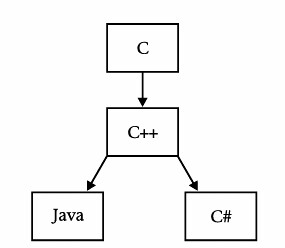
C# is a modern programming languages that is a descendant of C++ but is grouped together with Java. Some people says that C# is actually a competing technology created by Microsoft to go against Java. True or False, I'm not here to defend which one is correct, but am here to share my notes on C#.

The family tree of C# is shown below :

Ch1Img1.gif


So C# is actually on the same level as Java. You can think of it as brothers, sisters, or cousins. But both are descended from C++

C# and the .NET Framework


The C# LanguageC# is a new and modern programming language provided as part of the .NET Framework. It is an Object Oriented Programming language and has it's core many similarities with Java and C++. Some of the attributes by this language includes :


  • C# does not allow multiple inheritance but allows multiple implementation of interfaces
  • Provides Garbage Collection so that programmers does not need to worry of memory allocations and pointers.
  • It maintains unique operations of C++ like operator overloading, enumerations, pre-processor directives, delegates (or function pointers in C++)
  • It supports concepts of properties, reflections, attributes, marshalling, remoting, threads, streams, data access etc.
Next we will discuss .NET Framework.


The .NET Framework
.NET framework is a new framework which includes large libraries called Framework Class Library, allows and it supports several programming languages which allows language interoperability (each language can use code written in other languages). The .NET library is available to all the programming languages that .NET supports. Some of the languages it supports includes C#, F#, VB.NET, C++ among others.


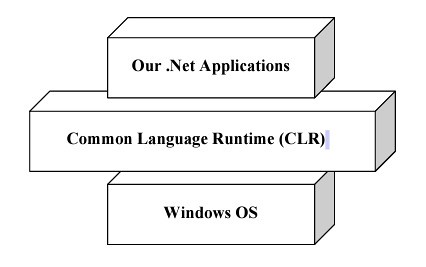
The most important piece of this framework is the CLR or Common Language Runtime. It is a framework that sits on top of the OS and allows execution of the language developed for .NET framework. We can show it by the below diagram.

201104101632.jpg

*From Programmers Heaven C# School Book

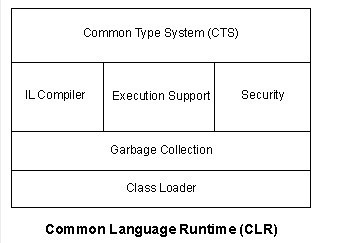
Common Language Runtime (CLR)CLR or Common Language Runtime is an environment at which we can run our .NET Applications that have been compiled by IL Compiler. If you are familiar with Java, consider CLR as JRE.

To further breakup CLR, a diagram is shown below : (1)

201104101652.jpg

*From CodeProject

  • Common Type System- It is responsible for interpreting data types for .NET framework. E.g. how many bytes there is in a String object. CTS defines the basic data types to what an IL can understand. Each language should map it's data types to these standard data types. This is quite powerful and allows 2 languages to understand each other such as passing and receiving parameters to each other.
  • IL Compiler - IL Compiler compiles the IL Code to the Machine Language. IL actually means Intermediate Language. When you compile your code, the code gets compiled to an Intermediate Language, much like a Java is compiled to a Java Byte Code. However, afterwards, this IL will be fed to the CLR so that it gets compiled to a machine language code.
  • Execution Support - It is similar to the language runtime (e.g. VBRunxxx.dl in VB however in .NET there's no individual language runtimes anymore).
  • Security - Provides the security context on the application, and ensures the application has permission to certain functions.
  • Garbage Collector - It is similar to the garbage collector found in Java, which collects stale objects or unused/unreferenced objects, and releases the allocation to the heap memory.
  • Class Loader - The purpose is to load the classes needed by the application.

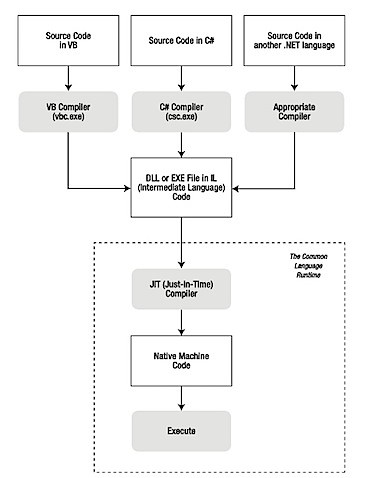
To understand, here's a sample :
  1. Programmer writes the source code and compiles it.
  2. Language compiler compiles it to IL. ( This is called Assembly )
  3. WHen the applciation is run the following happens :
  • It checks the assembly's security characteristics.
  • It allocates space in memory.
  • It sends the assembly to the IL Compiler (also called Just-in-time compiler) which compiles portions of it to native machine code. Only portions of the code is compiled as it is needed. If it's not needed during execution, it is not compiled.

The diagram below from the book Beginning ASP.NET in C# 2010 shows how the compilation works.

201104101836.jpg


.Net Framework also provides a large and extensive library called Framework Class Library (or Base Class Library). It's sole purpose is to provide easy to use API's that are available to your application, such as :
  • General Base Classes - Classes that provides set of tools for programming tasks such as file manipulation, string manipulation, security, encryption, etc.
  • Collection Classes - Classes that implements lists, hashtables, etc.
  • Threading and Synchronization classes - Classes for building multi-threaded programs
  • XML Classes - Classes for XML manipulation
  • Data Classes - Classes used for Data Access and manipulation.
So there, I've discussed about .NET framework and C# as an overview. Next, we will start taking a look at C# in-depth.

Sunday, May 15, 2011

HTTP 500.19 Errors in IIS 7 - Site is on Mac and IIS is on VMWare Fusion/Parallel


I was tinkering around my IIS 7 which comes on my Windows 7 Guest on VMWare fusion. I have my web application stored on my Mac Drive and IIS on VMWare. Apparently, when I try to share the drive via VMWare share to Windows, and I try to browse the site, I get this error :


HTTP Error 500.19 - Internal Server Error
Description: The requested page cannot be accessed because the related configuration data for the page is invalid.
Error Code: 0x8007052e
Notification: BeginRequest
Module: IIS Web Core
Requested URL: http://localhost/
Logon User: Not yet determined

Logon Method: Not yet determined
Handler: Not yet determined
Config Error: Cannot read configuration file
Config File: \\?\UNC\vmware-host\webapp


So how I made it work ? We must not use VMWare sharing but instead use Mac OSX Samba Sharing.
MAC OS X Instructions

  1. Create an account called IIS_UsrAccess on Mac OSX (or any account). Make sure that this is a sharing account for security. Remember the password you used on Mac OSX.
  2. Go to System Preference -> Sharing
  3. Tick on File Sharing
  4. Click on Options
  5. Tick : Share files and folders using SMB (Windows)
  6. On the account below, choose IIS_UsrAccess
  7. Click on Done
  8. Add a the folder you want to share to Windows under Shared Folders
  9. On the users, add IIS_UsrAccess and choose Read or Read and Write.
  10. Close.
  11. Browse the Folder via Finder
  12. Under the folder you shared, right click and choose Get Info
  13. Below, you would see Sharing and Permissions as shown here : 
14. Add iss_usraccess. Now depending on the priviledge you want to grant, it could be read only or read and write. 

15. Locate your web.config file on this app and do the same as point 14. If you want to manage web.config from IIS, choose read and write for iis_usraccess account.

Now we're done on Mac OSX. We will now go to windows.

  1. Test first on your Windows if you are able to access the shared folder by going to Windows Explorer and \\\. Example, on my machine I typed \\MyMac\Web and I'm able to browse the folder.
  2. Create an iis_usraccess account on Windows and use the same password you used on Mac OSX. This is to allow account pass through.
  3. Once this is done, go to IIS Manager.
  4. Create an Application by doing Add Application or Create a Virtual Directory by clicking Add Virtual Directoy (I Assumed you already have a site
  5. On Alias, choose whatever alias you want. On Physical Path, choose \\\. 
  6. Click on Connect As... and on new window, type in Specific User and then click on Set. Once Set is clicked, type in on the Username iis_usraccess and password of the user you created on windows and mac os x.
  7. Once done, click on Test Settings.
  8. It should be both green, meaning you are now able to browse the site.

Tuesday, May 10, 2011

Mother's day savings for VMWare Fusion 25% Off.

Hurry.. Avail of the Fusion discount... Just type in FusionSavings on the coupon when you check out and enjoy 25% off on your purchase...

http://app.connect.vmware.com/e/es.aspx?s=524&e=19486056&elq=b866baf30ad9412998b2f8fdf856dd93&OPENID=Browser

Check it out...

Offer valid until May 13, 2011

Thursday, May 5, 2011

I've switched to VMWare Fusion because of Portability with VMWare Player

Ok, so Parallel Desktop is faster than VMWare Fusion. Given this fact, I've decided to switch to VMWare Fusion. Reason is : Portability and Cost.

I need my VM to work on Windows as well. Meaning that the VM that I created, I should be able to run on my office PC. Ofcourse, because its a property of the company that employs me, I cant possible buy a Parallel Desktop for Windows and install it there. And granted that I cant, I need to be cost conscious as well.

While Parallel seems faster than VMWare, VMWare is not bad at all when running on MacOSX. It does not hang my Mac and I can run it really side by side. On my experience, VMWare works for me, though ofcourse, because I'm running it professionally to work on my Visual Studio and others that I need which can be run only on Mac, I don't need those 3D acceleration, themes etc. so I did a tweak on my Guest OS. And after that, the difference is really not noticeable at all, in-fact it seems to be like I'm running Parallel.

I tried running my Guest OS on VMWare player and it works flawlessly. So this means, wherever I go, I can bring my VM and use that to work on anything.

Cost. VMWare Player is free. Going with Parallel means I need to Parallel on Mac and Windows which will cost me 200 dollars vs VMWare which costs me 79.99 (only Fusion). That's a big difference.

Also, I read on forums that upgrading Parallel actually costs you, while on VMWare, I can have a major version without a cost on me since I've subscribed on their 19.99 dollars subscription for 12 months. Since there's a talk of VMWare Fusion 4, that is a big savings for me. (I will save 39.99 dollars)

So there, reason why I moved to VMWare Fusion.

Wednesday, May 4, 2011

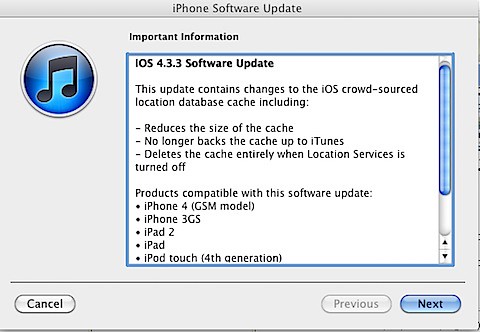
IOS 4.3.3 released - Includes Location-Based Tracking Fix ?

A new version 4.3.3 of IOS has just been released. This seems to include the issue with storing your location.


201105051326.jpg


Here's the fix :


This update contains the changes to the iOS Crowd-Sourced location database cache.


- Reduces the size of the cache

- No longer backs up the cache to Itunes

- Deletes the cache entirely with Location Services is turned off.


Wednesday, April 27, 2011

Tired

Hospital then home then hospital... Havent logged in yet to office vpn... This week is tiring


- Posted using BlogPress Mobile

Monday, April 25, 2011

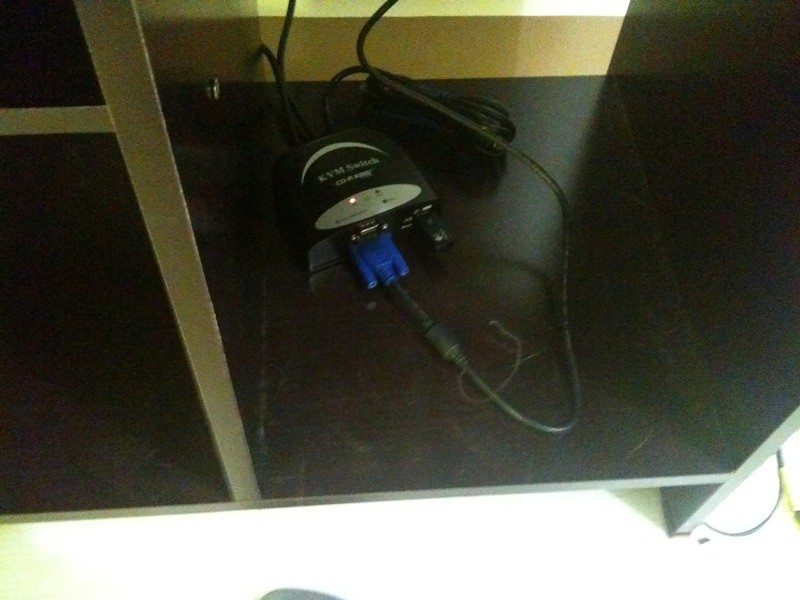
My Desk Setup - Logitech MK260 Keyboard, CD-R King KVM Switch and AON E2236VW LED Monitor.

Here's my setup : My Logitech MK260 is attached to the CD-R King KVM Switch with AOC e2236VW Led 21.5 inch Monitor as my secondary desktop to run Parallel Desktop Windows 7. They're all attached on MacBook Pro.

Logitech MK260 works good on MacOS X. It's a wireless combo that comes with a mouse. It's cheap in Philippines and will cost around 1750 pesos at Octagon. So I bought it when I was there.

AOC e2236VW monitor costs 7K+ at Asianic. It has a built in USB extension port so you dont need to connect anything on your PC but you can connect straight to your monitor. I bought it when I was there.

CD-R King KVM Switch was bought at 1450 PHP. So far so good. You need to press Scroll-lock twice then the number 1 for PC1 and 2 for PC2. Bought it when I was there.

So far so good. Here's the pic of my setup...