Hurry.. Avail of the Fusion discount... Just type in FusionSavings on the coupon when you check out and enjoy 25% off on your purchase...
http://app.connect.vmware.com/e/es.aspx?s=524&e=19486056&elq=b866baf30ad9412998b2f8fdf856dd93&OPENID=Browser
Check it out...
Offer valid until May 13, 2011
Tuesday, May 10, 2011

Thursday, May 5, 2011
I've switched to VMWare Fusion because of Portability with VMWare Player
Ok, so Parallel Desktop is faster than VMWare Fusion. Given this fact, I've decided to switch to VMWare Fusion. Reason is : Portability and Cost.
I need my VM to work on Windows as well. Meaning that the VM that I created, I should be able to run on my office PC. Ofcourse, because its a property of the company that employs me, I cant possible buy a Parallel Desktop for Windows and install it there. And granted that I cant, I need to be cost conscious as well.
While Parallel seems faster than VMWare, VMWare is not bad at all when running on MacOSX. It does not hang my Mac and I can run it really side by side. On my experience, VMWare works for me, though ofcourse, because I'm running it professionally to work on my Visual Studio and others that I need which can be run only on Mac, I don't need those 3D acceleration, themes etc. so I did a tweak on my Guest OS. And after that, the difference is really not noticeable at all, in-fact it seems to be like I'm running Parallel.
I tried running my Guest OS on VMWare player and it works flawlessly. So this means, wherever I go, I can bring my VM and use that to work on anything.
Cost. VMWare Player is free. Going with Parallel means I need to Parallel on Mac and Windows which will cost me 200 dollars vs VMWare which costs me 79.99 (only Fusion). That's a big difference.
Also, I read on forums that upgrading Parallel actually costs you, while on VMWare, I can have a major version without a cost on me since I've subscribed on their 19.99 dollars subscription for 12 months. Since there's a talk of VMWare Fusion 4, that is a big savings for me. (I will save 39.99 dollars)
So there, reason why I moved to VMWare Fusion.
I need my VM to work on Windows as well. Meaning that the VM that I created, I should be able to run on my office PC. Ofcourse, because its a property of the company that employs me, I cant possible buy a Parallel Desktop for Windows and install it there. And granted that I cant, I need to be cost conscious as well.
While Parallel seems faster than VMWare, VMWare is not bad at all when running on MacOSX. It does not hang my Mac and I can run it really side by side. On my experience, VMWare works for me, though ofcourse, because I'm running it professionally to work on my Visual Studio and others that I need which can be run only on Mac, I don't need those 3D acceleration, themes etc. so I did a tweak on my Guest OS. And after that, the difference is really not noticeable at all, in-fact it seems to be like I'm running Parallel.
I tried running my Guest OS on VMWare player and it works flawlessly. So this means, wherever I go, I can bring my VM and use that to work on anything.
Cost. VMWare Player is free. Going with Parallel means I need to Parallel on Mac and Windows which will cost me 200 dollars vs VMWare which costs me 79.99 (only Fusion). That's a big difference.
Also, I read on forums that upgrading Parallel actually costs you, while on VMWare, I can have a major version without a cost on me since I've subscribed on their 19.99 dollars subscription for 12 months. Since there's a talk of VMWare Fusion 4, that is a big savings for me. (I will save 39.99 dollars)
So there, reason why I moved to VMWare Fusion.
Wednesday, May 4, 2011
IOS 4.3.3 released - Includes Location-Based Tracking Fix ?
A new version 4.3.3 of IOS has just been released. This seems to include the issue with storing your location.
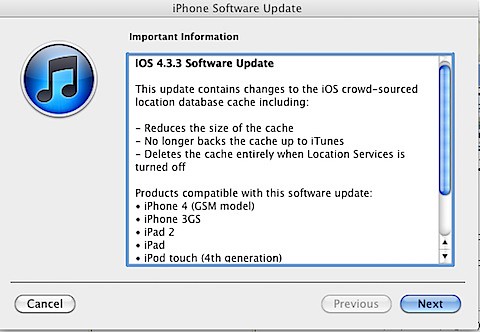
Here's the fix :
This update contains the changes to the iOS Crowd-Sourced location database cache.
- Reduces the size of the cache
- No longer backs up the cache to Itunes
- Deletes the cache entirely with Location Services is turned off.
Subscribe to:
Posts (Atom)
-
 So we have an EC2 instance on AWS. But we need to terminate it as the project has to give way to something urgent and therefore not on for...
 -
When updating MacOS High Sierra, you may experience this issue, where a couple of hours, you will be presented with an error Disk Management...